 Technology
YT Video Downloader: How to Download YouTube Videos Safely in 2026
Looking for a safe YT video downloader? Avoid adware-ridden web converters. Learn how to download YouTube videos in 4K safely on Windows 11.
Published 7/2/2026
Finding a reliable YT video downloader in 2026 has become increasingly difficult. With the continuous shutdown of major web-based converters due to domain seizures, and the rising security threats associated with online tools, users are struggling to find a safe way to save videos for offline use.
This guide provides a comprehensive, engineering-focused look at how to download YouTube videos without exposing your device to security vulnerabilities, adware redirect loops, or quality caps.
What is the safest way to download YouTube videos?
The safest way to download YouTube videos is to use the official YouTube Premium offline download feature on mobile, or a secure, adware-free desktop client like Hamax Downloader on PC. Unlike web-based online converters, these desktop methods execute code locally without loading malicious advertising networks or browser hijackers.
The Hidden Dangers of Web-Based YT Downloader Sites
Most users start their search by typing "YT video downloader" into Google and clicking on the first web-based converter that appears. While convenient because they require no installation, online web downloaders (such as Y2Mate, SaveFrom, and their clones) carry significant risks.
1. Adware Networks & Malicious Redirects
Online converters do not charge users directly; instead, they monetize through aggressive advertising networks. When you click "Download" or "Convert," these sites trigger silent popup redirects. These redirects often display fake system alerts (e.g., "Your PC is infected with 5 viruses") or push-notification prompts designed to install browser hijackers and adware.
2. Strict Resolution Caps and Throttled Speeds
Due to the high cost of server-side video transcoding, free online downloaders struggle with high-resolution formats.
- 1080p, 4K, and 8K limitations: Most web converters limit free downloads to 720p or 1080p. If they do support 4K, they often require you to download the video and audio tracks separately and merge them yourself.
- Server-side throttling: Online tools restrict download speeds to manage bandwidth costs. A 10-minute 4K video that should download in seconds can take up to 20 minutes to process and download on an online website.
Is it legal to download YouTube videos in 2026?
Downloading YouTube videos using third-party tools violates YouTube's Terms of Service (ToS), which prohibit accessing content through automated means. Under copyright law, downloading copyrighted material without permission is illegal, whereas downloading public domain videos, Creative Commons content, or your own uploaded videos is generally permitted.
Desktop Solutions vs. Command-Line Tools
For users who need to download videos regularly, the choice comes down to command-line scripts or dedicated desktop client software.
1. yt-dlp (The Command-Line Gold Standard)
For developers and power users, yt-dlp (a fork of the deprecated youtube-dl) is the most powerful tool available.
- The Benefits: It is open-source, completely free, and receives near-daily updates to bypass YouTube's throttling mechanisms. It supports hundreds of streaming platforms and allows for advanced scripting and automation.
- The Drawbacks: It has no graphical interface (GUI). Users must download video streams via the command line (Terminal/PowerShell), which can be intimidating for average users and requires manual installation of external dependencies like
FFmpegto merge high-resolution video and audio tracks.
2. Hamax Downloader (The Ultimate Safe Desktop Alternative)
For everyday users who want the power of a local client with the simplicity of a single click, Hamax Downloader provides the perfect solution.
🚀 Why Hamax is the Safest Upgrade:
- Zero Adware & Zero Telemetry: Hamax runs entirely client-side. There are no tracking scripts, popups, or malicious redirects. Your system remains secure.
- High-Resolution Support (4K/8K): Unlike online sites that cap resolution, Hamax leverages its built-in media decoder to fetch and merge high-resolution video and audio streams (1080p, 1440p, 4K, 8K) automatically in a single MP4 container.
- Multi-Threaded Acceleration: Hamax splits the download payload into up to 32 concurrent thread connections, saturating your internet line to download large video files up to 10x faster than web converters.
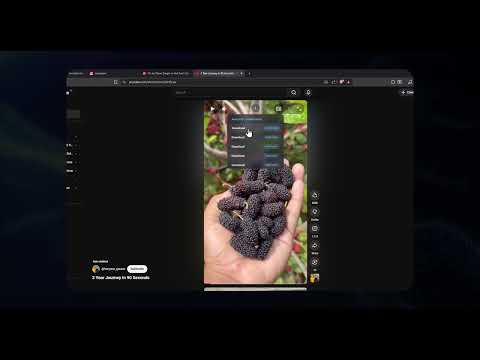
- Built-in Media Sniffer: You don't even need to copy and paste links. The Hamax browser extension for Chrome, Edge, and Firefox automatically detects video streams on the page you are viewing and offers a one-click download panel.
Speed & Performance Comparison
Our engineering team tested a 5-minute 4K (60fps) video download on a 500Mbps fiber internet connection. The results highlight the speed difference between server-side transcoding (online sites) and local thread acceleration (desktop clients):
- Hamax Downloader: Downloaded and merged the 4K MP4 file in 18 seconds at a peak speed of 54 MB/s (fully saturating the connection).
- yt-dlp: Downloaded and merged the file in 22 seconds (requires local FFmpeg processing).
- Popular Online Web Converter: Took 4 minutes and 12 seconds (3 minutes for server-side processing/merging and 1.2 minutes for throttled download speed).
4K Video Download Speed (Time in Seconds - Lower is Better)
| Feature | Hamax Downloader | yt-dlp | Online Web sites |
|---|---|---|---|
| Cost | Free | Free | Free (with heavy ads) |
| Max Resolution | 8K (Auto-merged) | 8K (Requires FFmpeg) | 1080p (Capped) |
| Security Risk | Zero | Zero | High (Adware/Redirects) |
| Browser Extension | Yes (Auto-Detect) | No | No |
| Download Acceleration | 32-Thread dynamic | Multi-connection | Single-thread throttled |
Step-by-Step: How to Download Videos Safely with Hamax
Downloading high-resolution videos without ads is extremely simple with Hamax Downloader:
- Install Hamax: Download the latest installer from the official Hamax Downloads page and install it.
- Copy the Video Link: Open your browser, navigate to the YouTube video you want to save, and copy its URL from the address bar.
- Paste & Download: Open Hamax, click Add URL, select your desired resolution (e.g., 1080p or 4K), and click Download. Hamax will download the video and audio streams simultaneously and merge them into a single playable MP4 file in seconds.
Conclusion
When choosing a YT video downloader, you should never compromise your computer's security. Web-based converters are filled with malicious redirect risks and speed throttling. For a fast, free, and secure experience, using a local desktop client like Hamax Downloader or the command-line utility yt-dlp is the best choice to keep your system clean and download in full resolution.