 Engineering
Top free Alternatives to Internet Download Manager
Looking for a free alternative, a cross-platform solution, or a tool with smarter file management and faster download acceleration, the market is packed with powerful competing products that can match and sometimes exceed IDM's capabilities. From multi-connection downloading and batch downloading to seamless browser integration and video downloading support
Published 5/22/2026
Top free Alternatives to Internet Download Manager
Internet Download Manager (IDM) has long been the go-to download manager for millions of users worldwide, but it's not the only option worth considering in 2026. Whether you're looking for a free alternative, a cross-platform solution, or a tool with smarter file management and faster download acceleration, the market is packed with powerful competing products that can match and sometimes exceed IDM's capabilities. From multi-connection downloading and batch downloading to seamless browser integration and video downloading support, today's download manager software offers a rich set of features designed to meet every user's needs. In this in-depth software comparison, we'll walk you through the best Internet Download Manager alternatives in 2026, complete with ratings, reviews, pricing breakdowns, and a clear features comparison so you can make a confident, informed decision and choose the best download management tool for you.
Best Internet Download Manager Alternatives in 2026
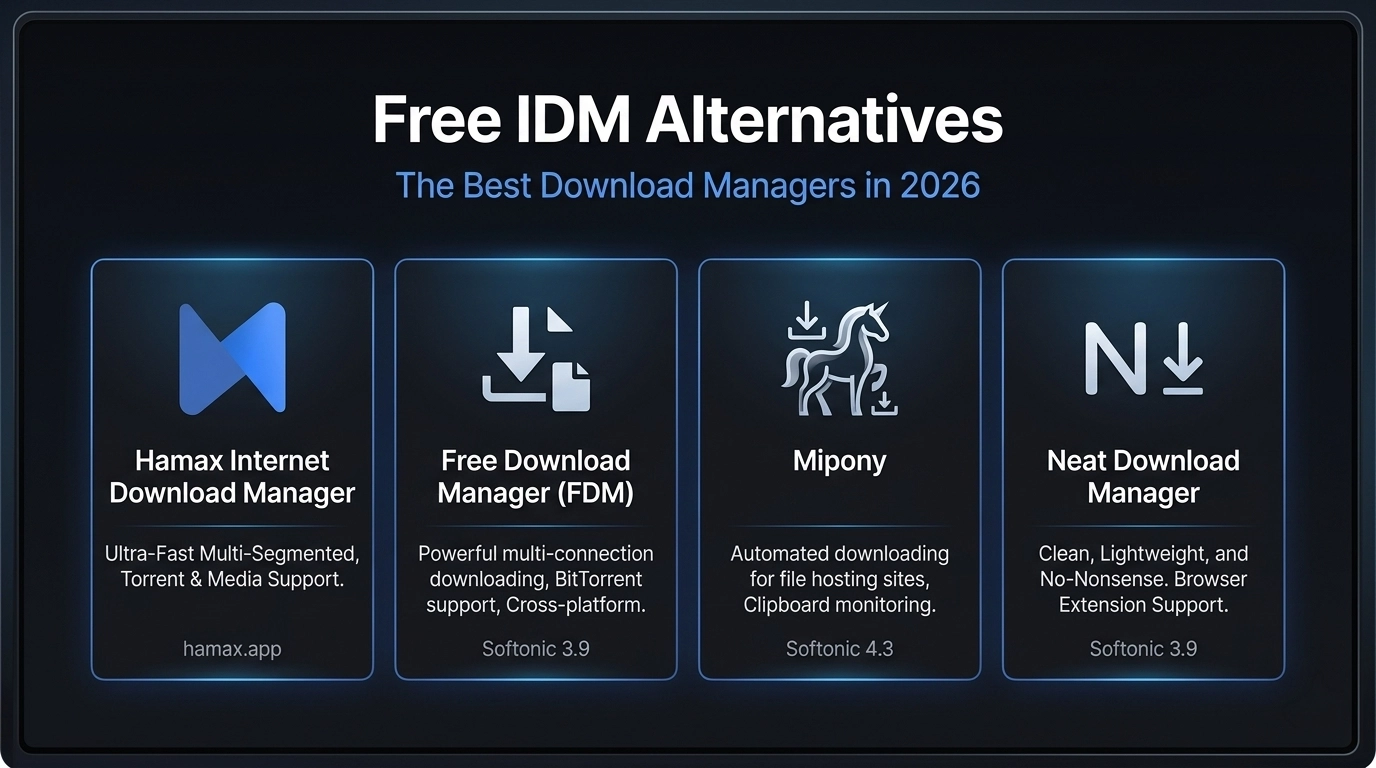
Hamax Internet Download Manager
If you're searching for a completely free alternative to Internet Download Manager, Hamax Internet Download Manager is a name worth knowing. Developed by the Hamax brand, this download manager software delivers a capable and user-friendly experience without costing you a single penny. Available at hamax.app, Hamax positions itself as a cost-effective download solution for users who want reliable file downloading functionality without the price tag attached to premium tools. As a no-cost software option, it removes the barrier of licensing fees while still functioning as a solid download utility for everyday use. Whether you're a casual user or someone who regularly handles large file downloads, Hamax Internet Download Manager presents itself as a practical, free download tool that deserves a spot on your shortlist of IDM alternatives in 2026.
Free Download Manager (FDM)
Free Download Manager (FDM) is one of the most well-known and widely used download managers for Windows, including full support for Windows 7. Listed on Softonic with a 3.9 rating, FDM has built a solid reputation as a versatile and efficient download manager that handles everything from everyday file transfers to more demanding downloading tasks — all at no cost. Where FDM truly stands out is in its range of features. It offers reliable download acceleration through multi-connection downloading, keeping your speeds optimized and your transfers moving efficiently. Downloads are neatly categorized for easy file transfer management, making the process clean and hassle-free. On the connectivity side, FDM supports multi-browser compatibility, offering smooth browser integration across major browsers, making it a genuinely cross-browser compatible tool for any Windows user.
Free Facebook Video Downloader
If saving social media content to your device is a priority, Free Facebook Video Downloader is a straightforward and dedicated tool built specifically for that purpose. Available on Softonic with a 3.7 rating, this free utility is designed for Windows users, including those still running Windows 7, and works seamlessly on both laptop and desktop computers. As the name suggests, its core strength lies in video downloading from Facebook, allowing users to extract and save user-generated content and media directly from the platform with minimal effort. The tool features a simple download interface that keeps the process accessible even for non-technical users, making offline video access quick and convenient without requiring any complex setup.
Neat Download Manager
Neat Download Manager lives up to its name. It's a clean, lightweight, and no-nonsense file transfer tool that gets the job done without overwhelming users with unnecessary complexity. Rated 3.9 and completely free, it is a solid desktop utility software available for both Windows (including Windows 7) and Mac, making it one of the more accessible cross-platform download managers on this list. As a simple download manager, Neat Download Manager is ideal for users who want a lightweight software experience focused purely on efficient and reliable internet file downloading. It doesn't try to do too much — instead, it stays focused on core file downloading functionality with clean download optimization under the hood, making it a dependable everyday file transfer tool for both casual and regular users. One of its practical strengths is browser integration, supported through a dedicated download extension that connects the tool directly to your browser for a seamless one-click download experience. This makes it a convenient browser-compatible download manager for users across different setups and workflows.
Windows Video Downloader
For Windows users whose primary need is saving online videos for offline viewing, Windows Video Downloader offers a focused and dedicated solution. Holding a 3.6 rating and available as a trial version, this desktop video downloader is built specifically for Windows and Windows 7 users who want a straightforward way to extract and store internet video content locally on their devices. Unlike full-featured download managers that cover a broad range of file types, Windows Video Downloader keeps its focus narrow and purposeful — it's a simple video saving tool designed around one core use case: downloading videos on Windows quickly and conveniently. Whether you're pulling content from streaming platforms, social media, or other online sources, the tool handles online video extraction and delivers reliable offline video access without a steep learning curve. As a lightweight internet video tool, it appeals to users who don't need the full feature set of a traditional download manager and simply want to save online videos to their PC for later viewing. Its clean approach to media content downloading makes it accessible for everyday Windows users, including those on older systems like Windows 7.
MP3 Downloader
For users whose downloading needs are centered around music, MP3 Downloader is a dedicated audio downloading tool designed to make building and managing a digital music library as simple as possible. Rated 3.5 and offered as a trial version, it is compatible with Windows and Windows 7, making it accessible to a wide range of PC users looking for a reliable music downloader for Windows. At its core, MP3 Downloader focuses on MP3 file downloading and online music library access, giving users a straightforward way to save tracks and audio content directly to their devices. One of its most practical features is YouTube to MP3 conversion, functioning as a capable YouTube downloader that lets users extract audio from YouTube videos and save them for offline music access, a popular use case among Windows users searching for a dependable YouTube to MP3 for Windows 7 solution. As a piece of media conversion software, it fills a specific gap in the download manager landscape, not a broad file downloader, but a focused audio downloader built around music. The trial version is a factor to weigh against fully free alternatives, but for users who primarily want to download MP3 songs and manage audio content on Windows, MP3 Downloader is a targeted and functional option worth considering in 2026.
Microsoft Download Manager
When it comes to brand authority and native reliability, Microsoft Download Manager carries a level of trust that few competing tools can match. Rated 3.8 and completely free, this official Microsoft utility is built exclusively for Windows and serves as a clean, system-integrated solution for everyday file downloading and download management needs. As a native Windows utility, Microsoft Download Manager benefits from deep Windows integration, meaning it works in harmony with your operating system rather than layering on top of it like a third-party application. This makes it one of the most stable and dependable file transfer tools available for Windows users who prefer keeping their software ecosystem within the Microsoft environment. Its simple download interface keeps the experience accessible and distraction-free, prioritizing function over unnecessary features. While it may not offer the extensive feature set found in more specialized download managers, its strength lies in being official, lightweight, and fully aligned with Windows as a platform. For users searching for a trusted Microsoft download manager free option or a straightforward Internet Download Manager for Windows alternative that comes backed by one of the world's most recognized software brands, this tool delivers exactly what it promises — reliable, no-cost download management without the need for any third-party dependencies.
Mipony
Among the more impressively rated tools on this list, Mipony stands out with a strong 4.3 rating and comes completely free — making it one of the best value picks for Windows and Windows 7 users looking for a smarter, more automated approach to download management. What sets Mipony apart from basic download managers is its focus on file hosting service downloads and intelligent file transfer automation. It is purpose-built for users who regularly download from file hosting platforms, streamlining a process that can otherwise be tedious and time-consuming. Rather than manually copying and pasting links, Mipony's clipboard monitoring feature automatically detects copied download links and queues them up without any extra steps — making it a genuinely useful link grabbing software for high-volume downloaders. Adding to its automation capabilities, Mipony includes a built-in web browser, allowing users to browse, detect, and initiate downloads from directly within the application. This level of integration removes the friction of switching between a browser and a download manager, creating a smoother and more unified automated downloading workflow from start to finish.
Hamax Downloader, 99, [winner] Mipony, 90 Free Download Manager, 88 Neat Download Manager, 85
Feature, Hamax, FDM, Neat DM Cost, Free, Free, Free Multi-threaded, ✓, ✓, ✓ Media Grabbing, Max, Mid, Low Native Torrents, ✓, ✓, ✕
Conclusion
Choosing the right download manager ultimately comes down to your specific needs, workflow, and operating system. In 2026, users are no longer limited to a single dominant tool — the landscape of Internet Download Manager alternatives is rich, diverse, and increasingly capable. Whether you're looking for a completely free solution like Hamax Internet Download Manager or Free Download Manager, a brand-trusted option like Microsoft Download Manager, a cross-platform lightweight tool like Neat Download Manager, or an automation-powered utility like Mipony, there is a strong and reliable option available for every type of user. For video-focused needs, tools like Windows Video Downloader and Free Facebook Video Downloader fill niche but important gaps, while MP3 Downloader serves users whose priorities sit firmly in the audio space. Each tool reviewed in this guide brings its own strengths to the table, and the best choice is the one that aligns most closely with your downloading habits, device setup, and budget. The good news is that most of these alternatives are either completely free or available as trial versions, meaning you can test them with zero financial commitment before deciding. As download management software continues to evolve through 2026 and beyond, users have more power than ever to find a tool that genuinely fits their needs — without being locked into a single paid solution.
Frequently Asked Questions (FAQs)
- What is the best free alternative to Internet Download Manager in 2026?
Several strong free alternatives exist in 2026, but Hamax Internet Download Manager and Free Download Manager (FDM) are among the top picks. Both offer reliable download acceleration, browser integration, and multi-format support at absolutely no cost, making them ideal replacements for IDM without the licensing fee.
- Which Internet Download Manager alternative works on both Windows and Mac?
Neat Download Manager is one of the few tools on this list that offers genuine cross-platform support, working smoothly on both Windows and Mac. It is free, lightweight, and comes with browser extension support, making it a practical choice for users who switch between operating systems.
- Can I download videos from Facebook for free on Windows?
Yes. Free Facebook Video Downloader is a dedicated free tool available for Windows — including Windows 7 — that allows users to extract and save Facebook videos for offline access. It also supports audio downloading, adding extra versatility for social media content saving.
- Which download manager is best for automating downloads from file hosting sites?
Mipony is the standout choice for automation. With its built-in clipboard monitoring, automated link detection, and integrated web browser, it is specifically designed to handle downloads from file hosting services with minimal manual input — making it the most automation-friendly tool reviewed in this guide.
- Are trial version download managers worth using?
Trial versions like Windows Video Downloader and MP3 Downloader are worth trying, especially if your needs are niche and specific. They allow you to test core features before committing. However, if you need a full-featured tool with no restrictions, opting for a completely free alternative like Free Download Manager or Mipony is the smarter long-term choice.